Built for the way repair shops really work.
All-in-one repair shop software: service orders, customers, point of sale, inventory, scheduling and reports. Every flow starts at the counter and finishes in place. No dead ends, no second screen. Here's everything in the box.
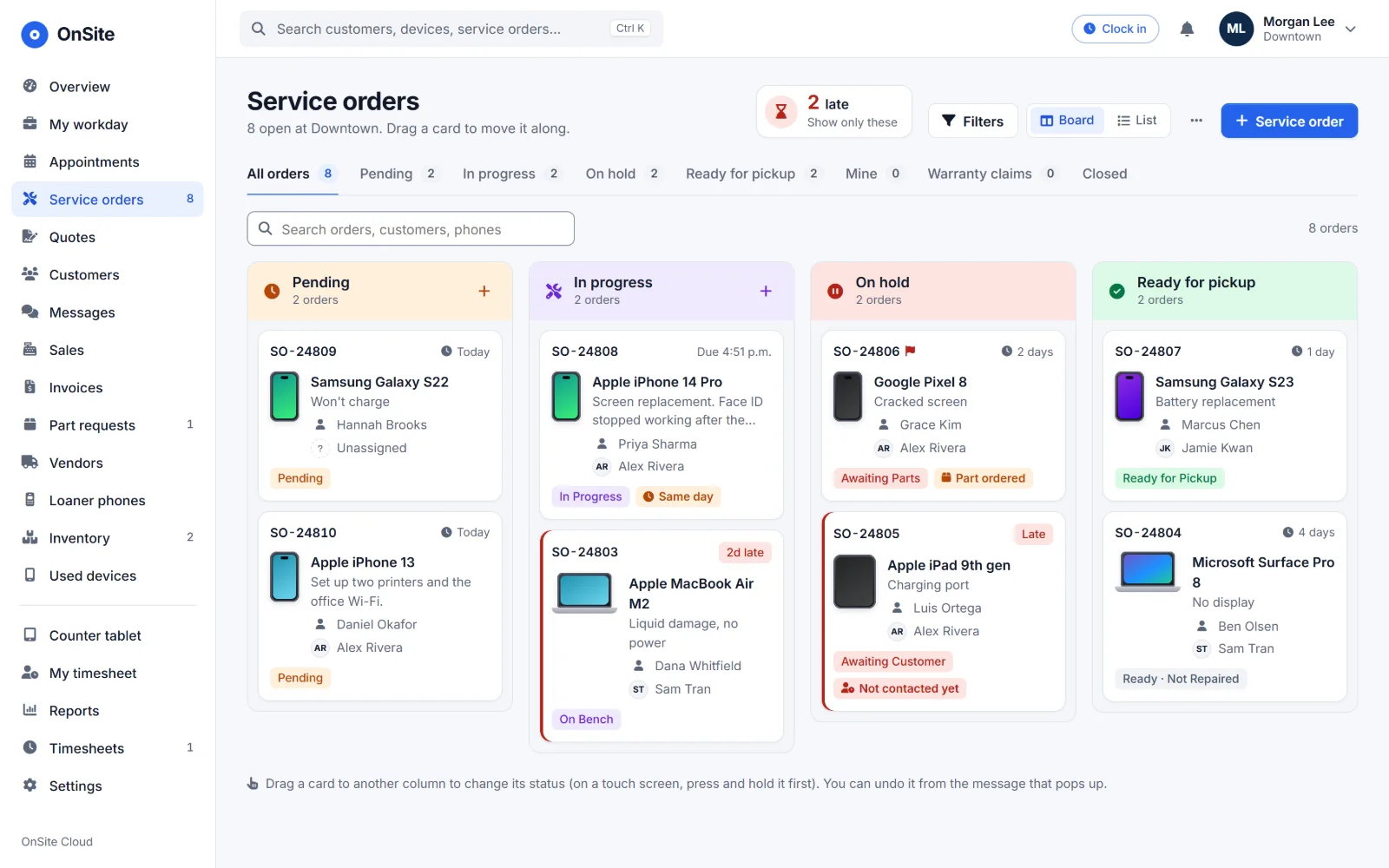
Service orders
From the first "it won't turn on" to the last signature. Every repair has one home, and everyone can see where it stands.
Guided intake
Customer, device, problem and job in four quick steps, with drop-off checks along the way.
Repair board
Pending, in progress, on hold and ready, as a board or a list. Every card says why it's waiting.
Automatic routingPro
Send each device type to the right technician the moment it's checked in.
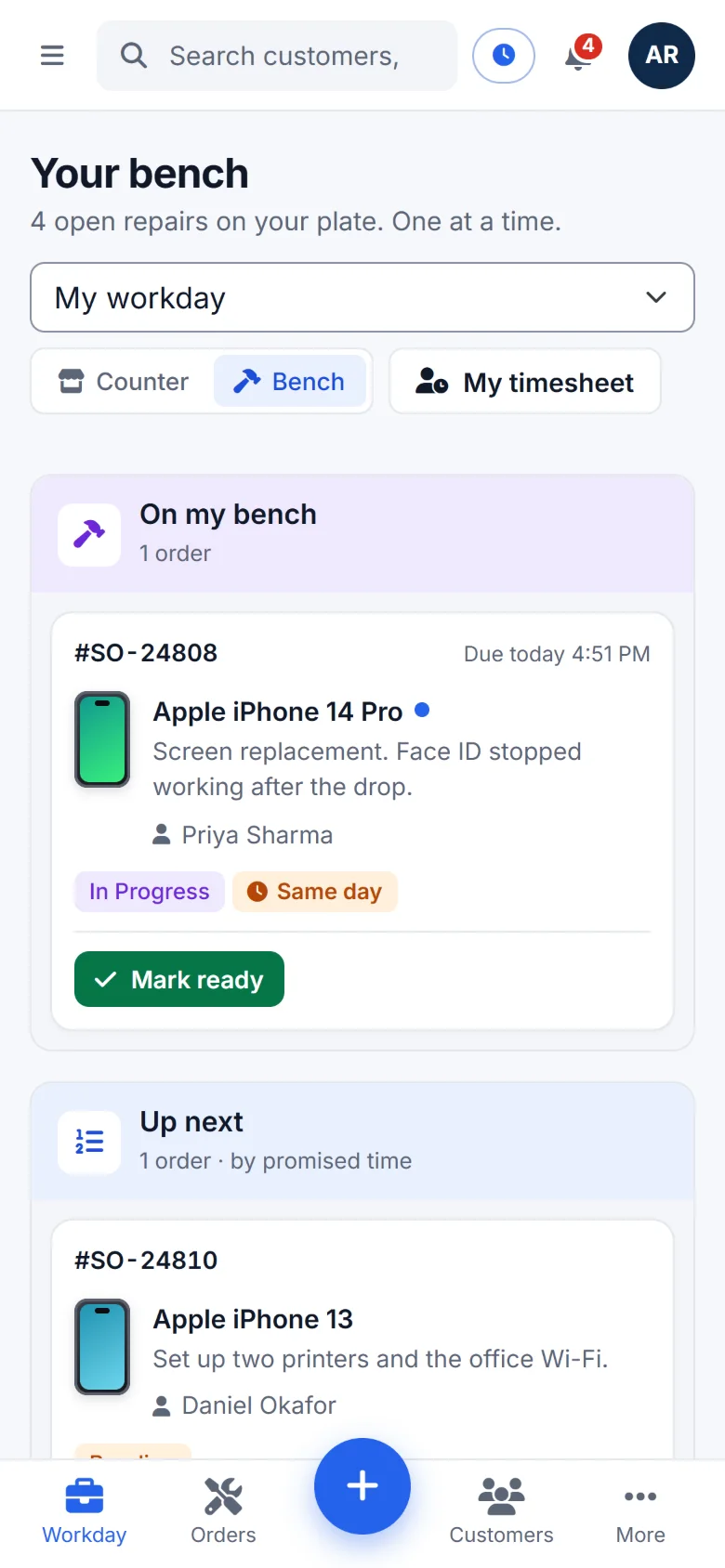
My workday
Each technician sees their bench, their follow-ups and what's promised today.
Deposits and signatures
Take a deposit and capture a signature before the customer leaves the counter.
Tickets and QR labels
Print the ticket and a device label. Scan the label in the shop to open the order.
Quotes and approvals
Text or email a price. Customers approve or decline from a link and leave out any extras they don't want. A yes puts the repair back to work.
The Late list
Set a turnaround for each kind of job. Repairs that run past it are flagged on the board before anyone has to ask.
One timeline
Every note, message and status change on the order, with when each step happened and how long it took.
Customers and repeat business
Fewer "is it ready yet?" calls, and more customers who come back. They hear from you at every step, in your shop's name.
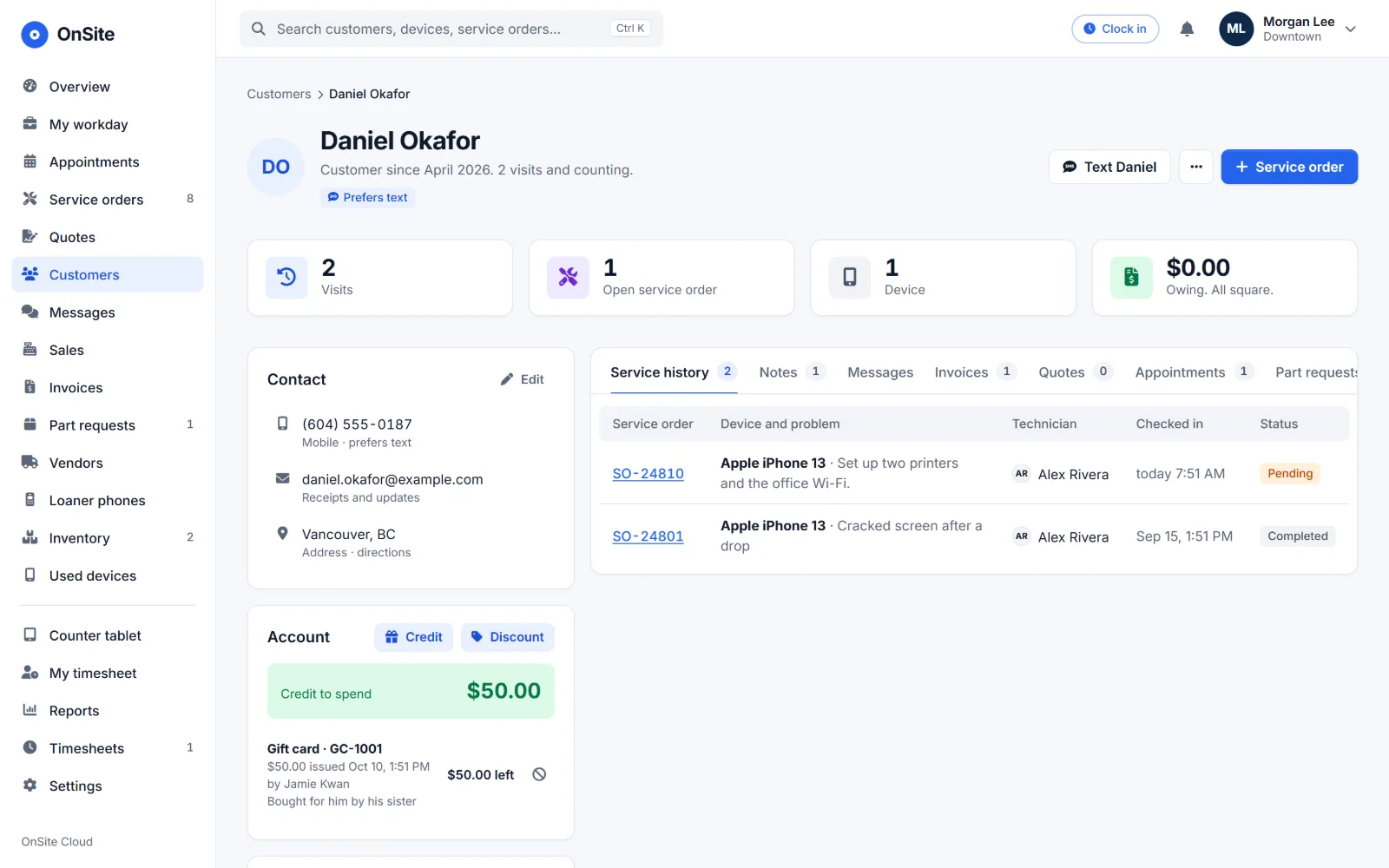
Customer hub
Devices, repairs, invoices, notes and messages on one page. Duplicate phone numbers caught at entry.
Two-way textingPro or add-on
Text from the order. Replies land right back on it, and you can see each text arrive.
Automatic updates
Choose which statuses send an email or a text, in your own words. Each waits a few seconds, so Undo calls it off.
Public device page
The QR on every label shows the repair's progress and warranty. No login, no names, no prices.
Warranty claims
Customers start a claim from the device page, verified by a code texted to the phone on file.
Credit and discounts
Store credit and standing customer discounts that apply at checkout on their own.
Pickup reminders
A nudge when a finished repair is still waiting, then a final notice before it's abandoned. Off until you turn it on.
Win-back listPro
See which customers haven't been back in a while, with their full repair history one click away.
Review requests
A few hours after pickup, customers get your review link. Never more than once a month each.
Counter and invoices
From a finished repair to a paid invoice without retyping a thing. Every cent adds up, every time.
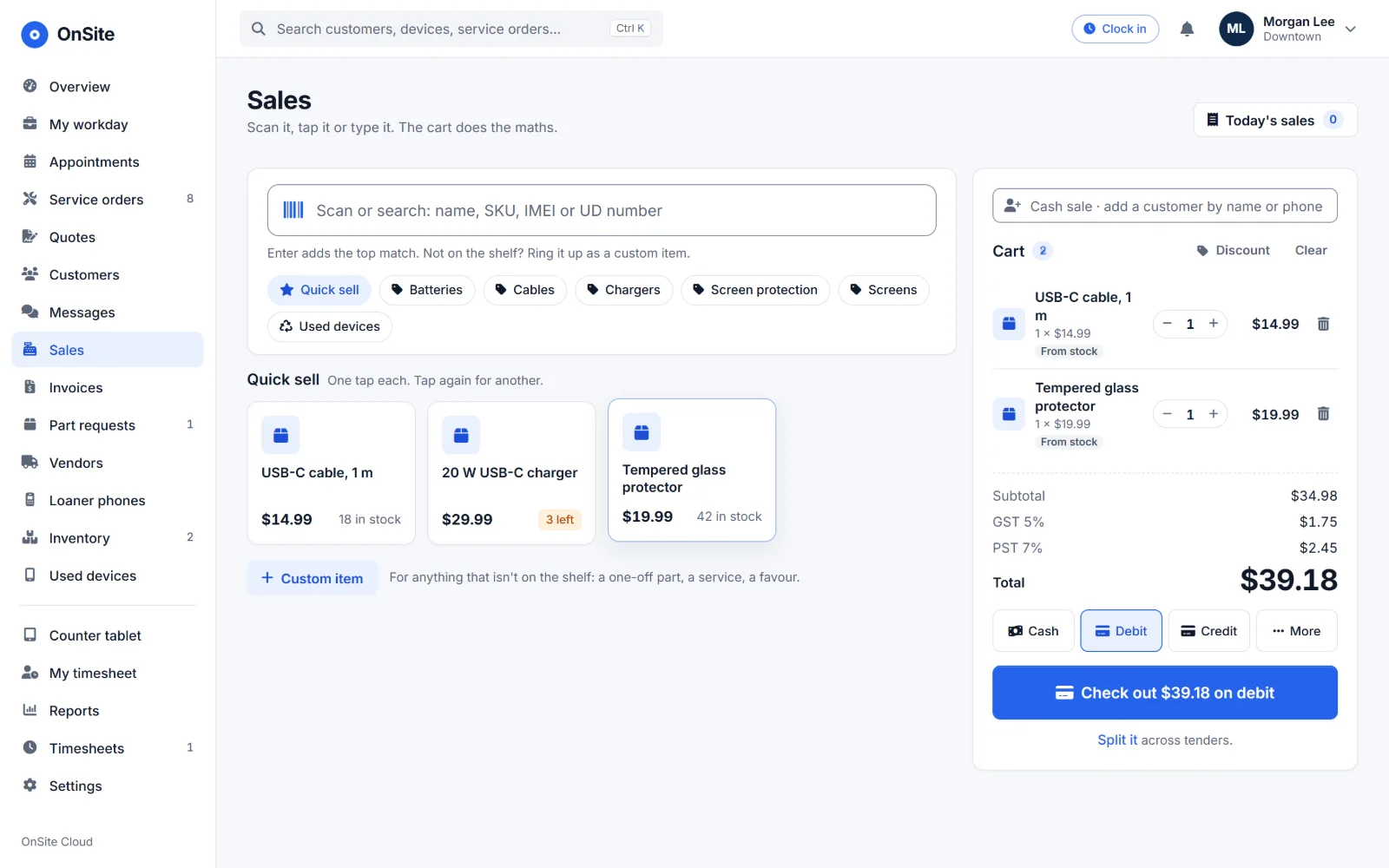
Point of sale
Quick-sell items, scan barcodes and take payment in a few taps. Cash rounds to the nickel.
Invoices from repairs
One click turns a finished order into an invoice, deposit already applied.
Card payments
Take cards through your own Stripe account, at the counter or online.
Refunds and store credit
Refund, reverse a payment or apply credit, with a clear trail behind every change.
End of day
Close out the day and get the summary emailed to you.
Print or PDF
Clean invoices and receipts, designed to go easy on your ink.
Pay links
Text or email a link to pay the balance online. Still unpaid a day later? Whoever sent it gets a reminder.
Discount limits
Set the biggest discount staff can give. Anything more needs an owner's or manager's PIN, and you choose who can refund.
Payment methods
Turn on the ways you take payment and name them your way, like e-Transfer.
Inventory and parts
Know what's on the shelf, what's on order and what's out on loan.
Part requests
From the order to the vendor to the bench, and the customer hears when it arrives.
Vendors
Supplier details and every part request you've placed with each one.
Parts stock
Parts by category, linked to the services that use them.
Used devicesPro
Resale stock tracked by serial number and marked sold at the register.
Loaner phonesPro
Check out, check in, lost or out of service, with a printable agreement.
Device catalogue
Manufacturers, models, services and prices, with bulk import to get started fast.
Prices by model
Price a service for a whole manufacturer or one model, with quality tiers if you offer them. Edit prices in a spreadsheet and upload them.
Appointments and house calls
Book in the shop or at the customer's door. Every house call lands on one map, with each technician's route ready to go.
AppointmentsPro
In the store or on a house call, with or without a repair. Bookable services, each person's hours and time off, and reminders sent for you.
Times that line upPro
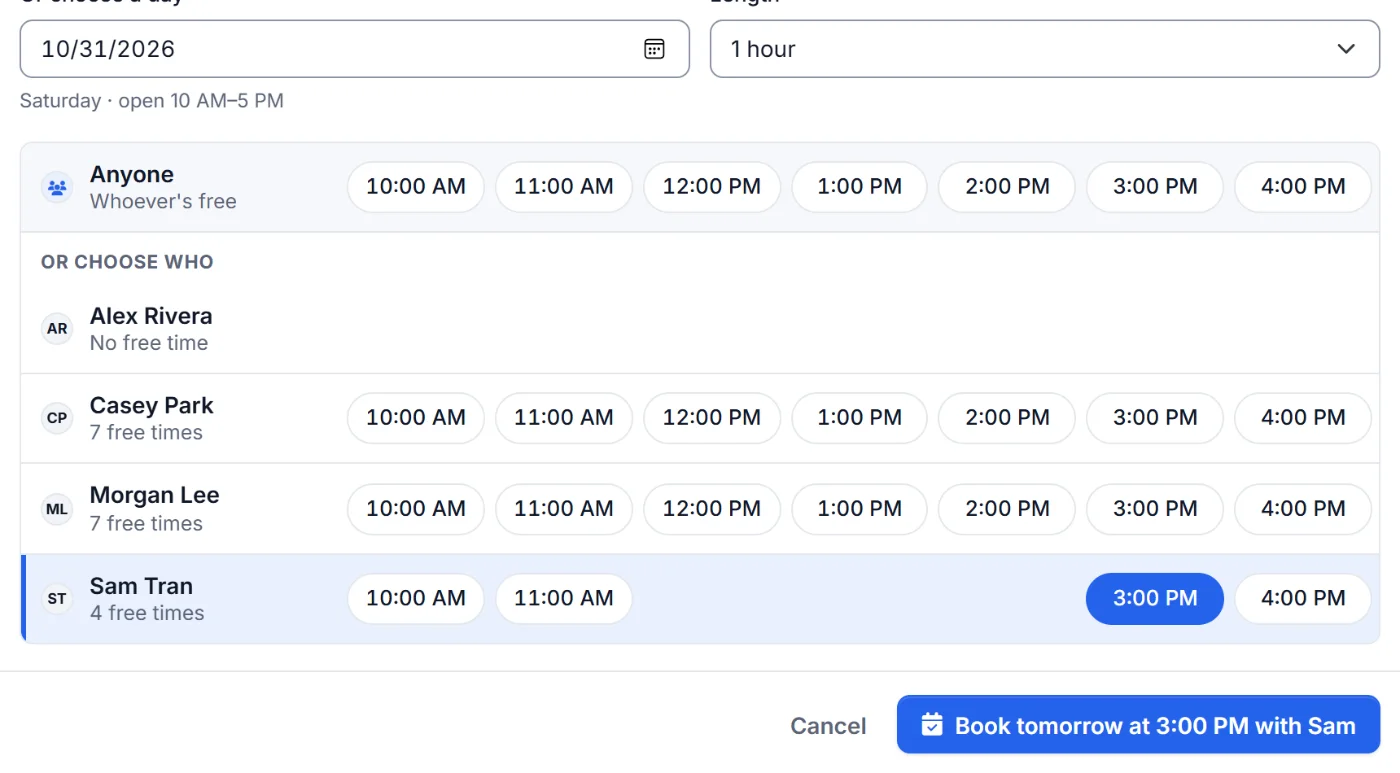
Free times sit in columns for anyone and for each person, so you see who's free when at a glance.
House calls on a mapPro
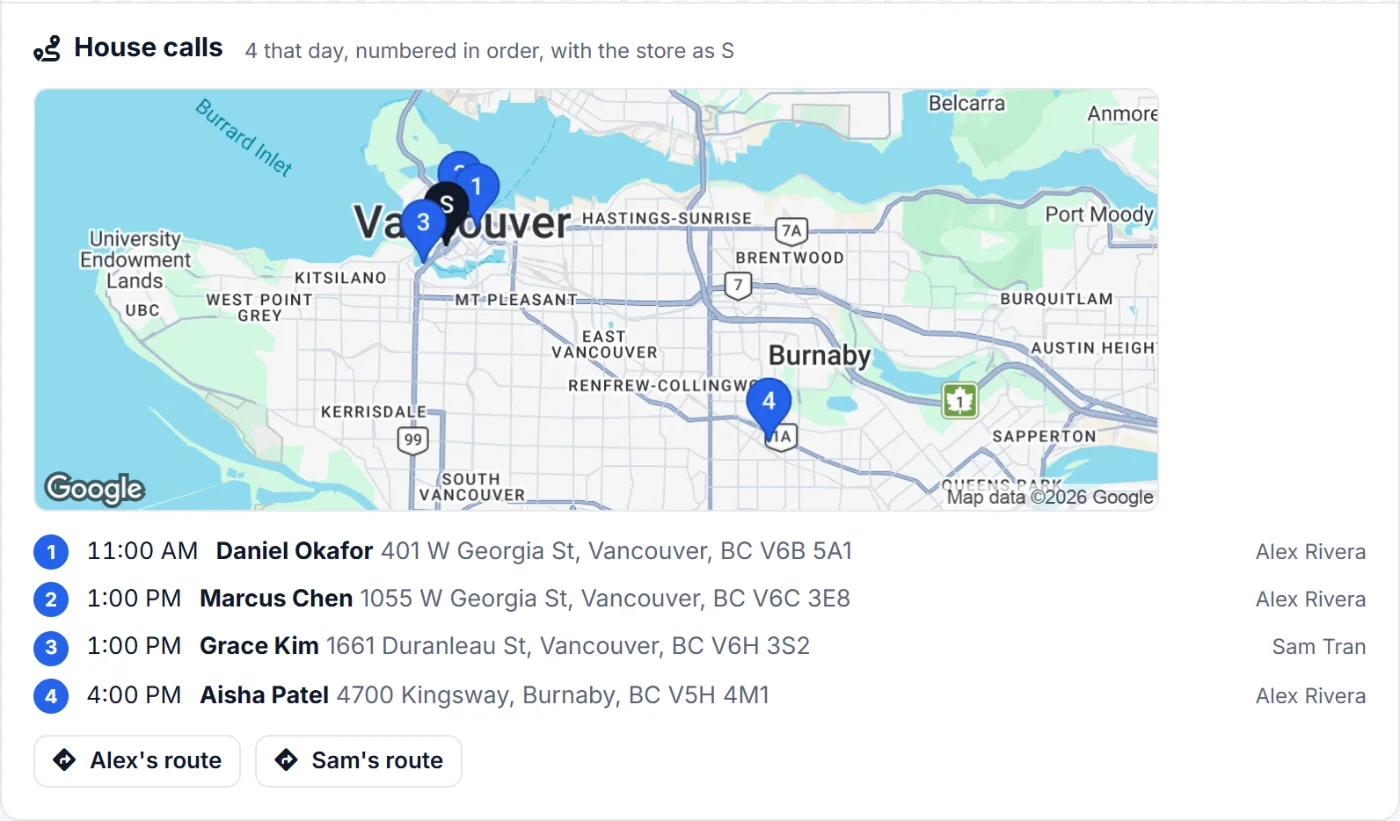
The day's house calls numbered in order on one map with the store, and each technician's route ready to follow, stop by stop.
Address lookup
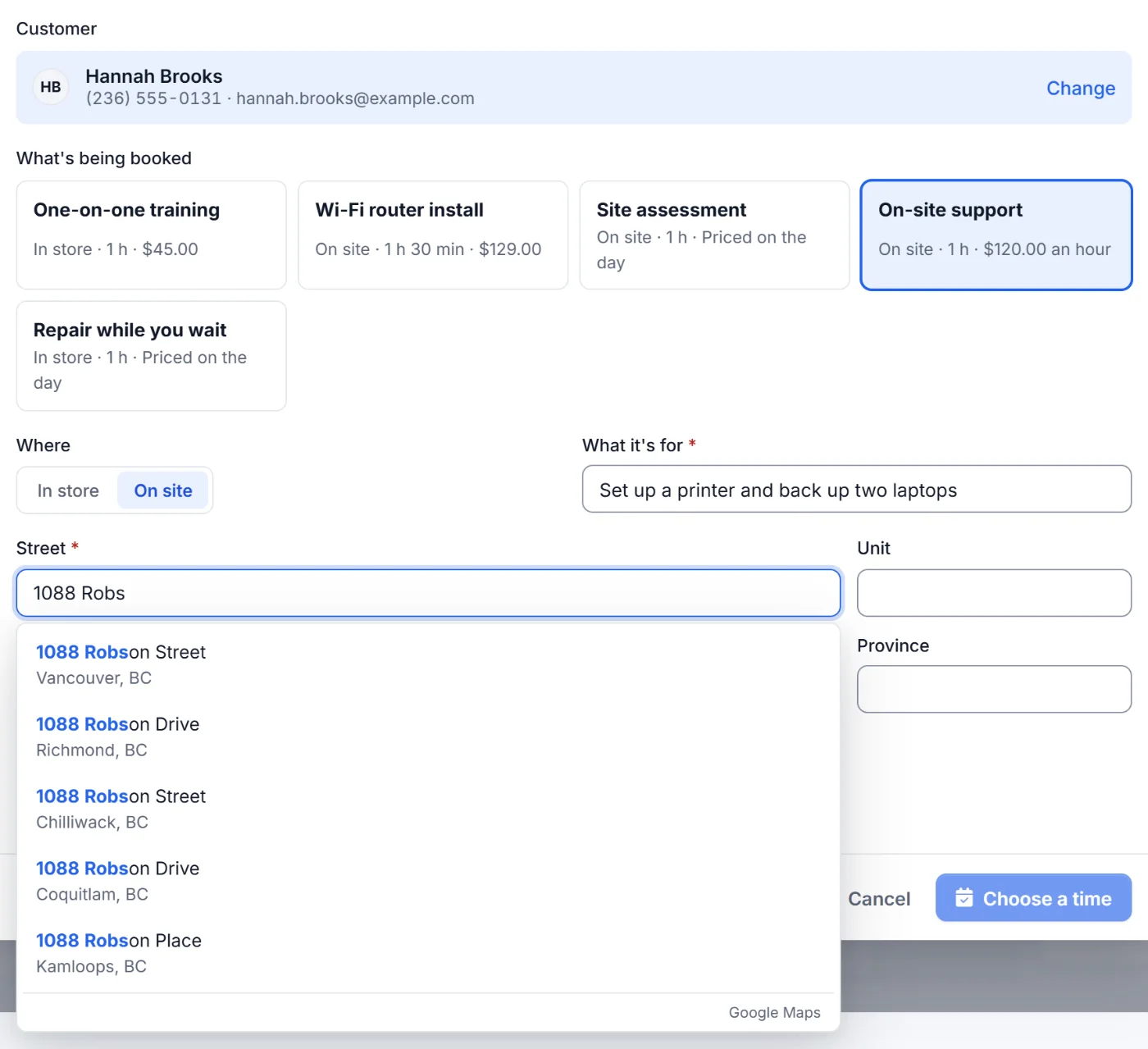
Type a few letters and the street, city, province and postal code fill themselves in. No typos, no wrong turns. Customers get the same on your booking page.
Where you goPro
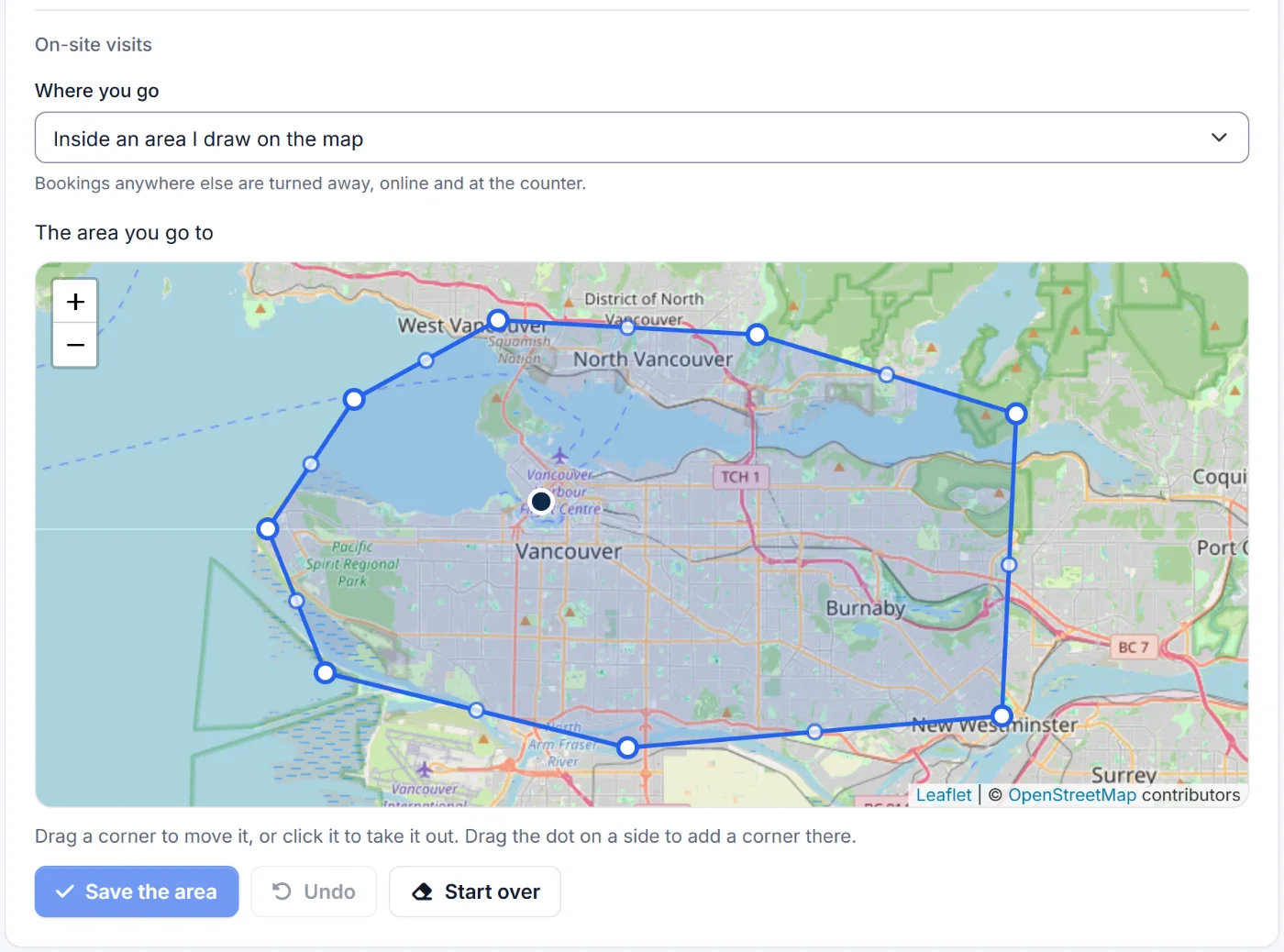
Up to a distance, only the towns and postal codes you list, or inside an area you draw. Staff need a manager's PIN to book outside it.
Change a bookingPro
Switch between in the store and on site, change the service or the address, and the customer gets the new details.
Online bookingPro
Customers book from your own page, straight into the calendar or as requests you confirm. They can move or cancel from their link.
Team and scheduling
Everyone works from the same live picture, and nobody steps on anyone's work.
Roles
Owner, manager, front desk and technician. Permissions follow each person's role in each store.
Live updates
Co-workers' changes appear as they happen, with who made them. No refreshing.
No lost edits
If two people change the same thing, OnSite shows the other change instead of quietly overwriting it.
TimesheetsPro
Hours, entries and history, rolled into a payroll summary.
Clock in and bench timersPro
Clock in and out with breaks, and time each repair at the bench. Labour shows by technician and by order.
Pinned notes
Pin what matters to the top of any order so the next person sees it first.
Your notifications
Each person picks which alerts reach their bell, with an evening email of anything they missed.
Reports and accounting
The numbers you need to run the shop, and a clean hand-off to the books you already keep.
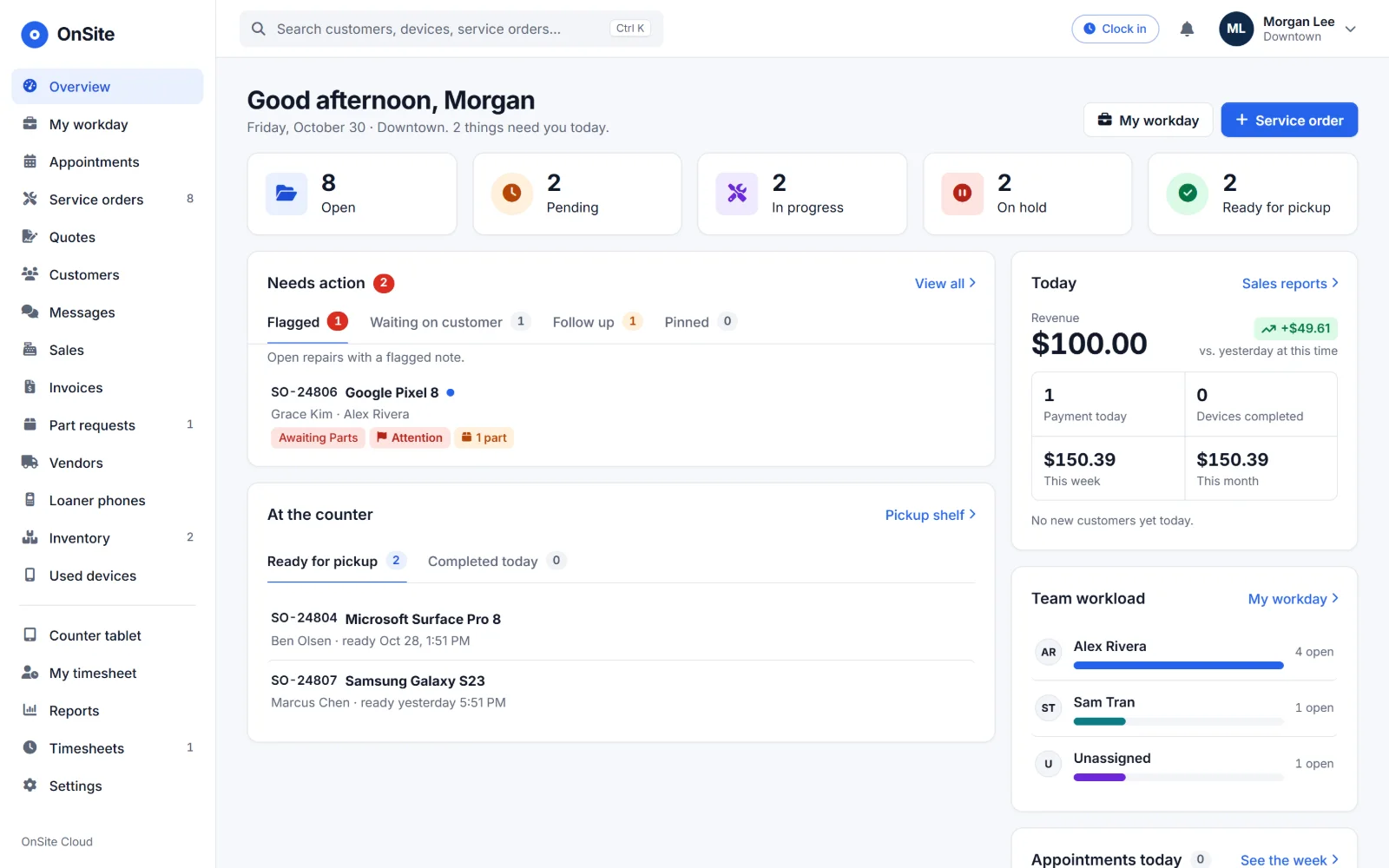
Today at a glance
The queue, what needs attention and what's ready, on one screen.
Sales
Daily, weekly and monthly sales. Pro adds sales by technician.
Intake and repairs
By device type and over time, so you can see what's coming in.
Business healthPro
Customers, lapsed customers, cost coverage and warranty stats.
QuickBooks OnlinePro or add-on
Connect once and sync, with a log you can actually read.
Accountant reports
Tax, aged receivables and the accountant export, each with CSV.
Multiple stores
Grow to more locations without growing your headaches.
One login, every store
Switch stores from the menu. Be an owner at one and a technician at another.
Copy a store's setup
Settings, price book, device models and checks, copied to a new store in one step.
Secure sign-in
Optional two-step sign-in, a list of signed-in devices to sign out, and new staff choose their own password the first time.
Payments and integrations
Plugs into the payment account, the books and the hardware you already have.
Stripe payments
Cards go through your own Stripe account, at the counter or online.
QuickBooks OnlinePro or add-on
Connect once and your sales sync to the books.
CSV exports
Hand your accountant tax and receivables reports in a file they can open.
Barcode scanners
A USB scanner at the desk or the camera on a tablet or phone.
Printers
Tickets, QR device labels, invoices and receipts, or save any of them as a PDF.
Any screen
Desktop at the counter, tablet on the bench, phone on a house call. Nothing to install.
See it with your own repairs.
Essentials covers the counter, and Pro includes everything on this page. Explore the demo store now, and get notified when we launch.